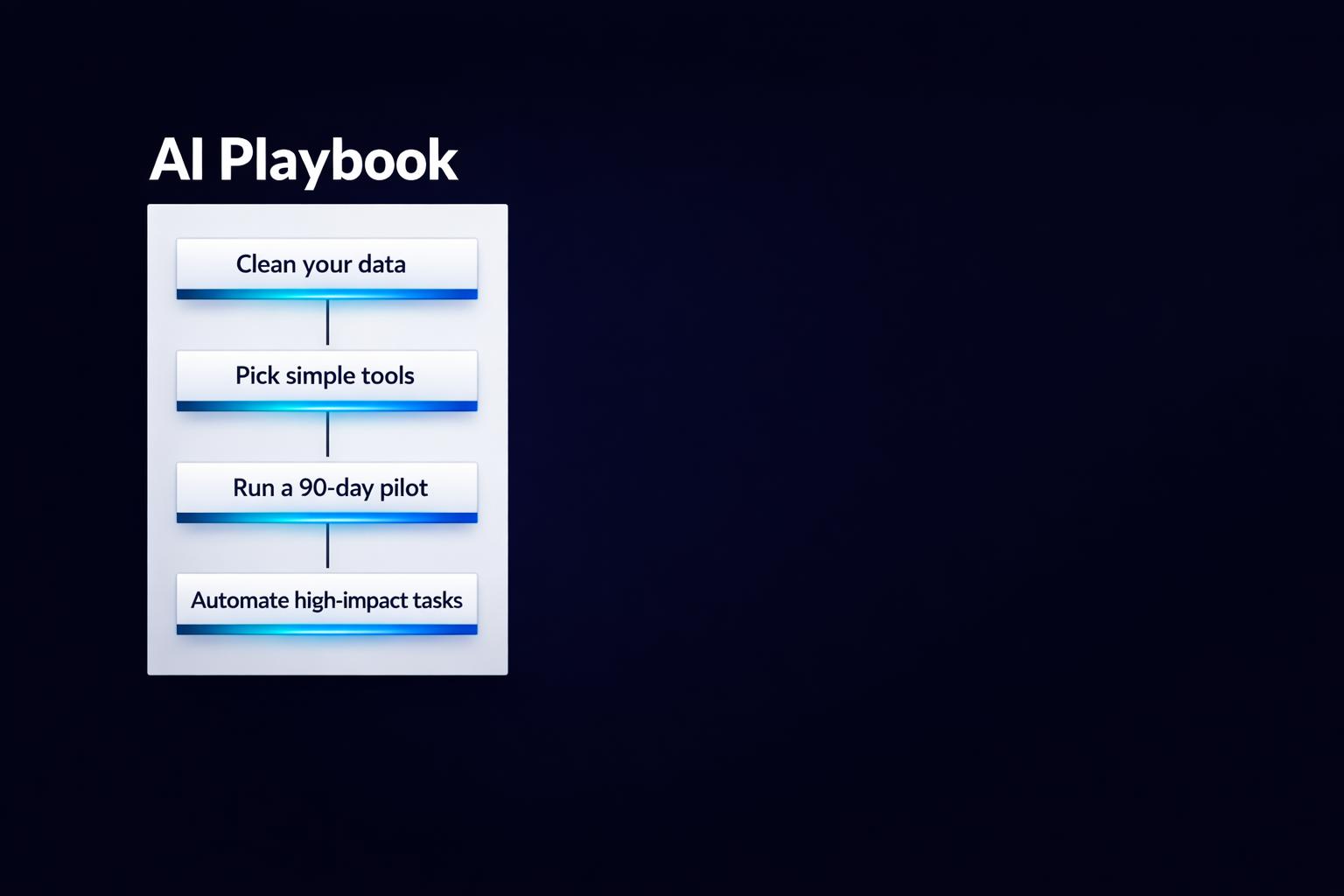
The Business Owner's Guide to AI: Where to Start, What to Skip, and What Actually Works
AI is no longer just for big companies - it’s now affordable and accessible for small businesses. By 2026, 68% of small businesses in the U.S. are expected to use AI regularly. With tools costing as little as $20–$50 per month, you can save time, cut costs, and stay competitive. But diving into AI without preparation can lead to wasted money and frustration.
Here’s how to get started:
- Step 1: Organize Your Data. AI needs clean, structured data to work effectively. Start by centralizing your information and setting up basic data policies.
- Step 2: Choose the Right Tools. Don’t overspend. Start with affordable tools like ChatGPT for drafting, Zapier for automation, or Tidio for customer service.
- Step 3: Start Small. Automate one repetitive task that drains time, like sorting emails or summarizing meetings. Test tools for 90 days before scaling up.
- Step 4: Avoid Common Pitfalls. Skip overly complex enterprise tools and ensure AI integrates smoothly into your current workflows.
AI can save small businesses $500–$2,000 monthly by handling tasks like customer support, lead generation, and data analysis. Focus on tools and projects that solve real problems, and always review AI outputs to maintain accuracy and trust.
Want to know what works and what doesn’t? Keep reading for actionable tips and examples.
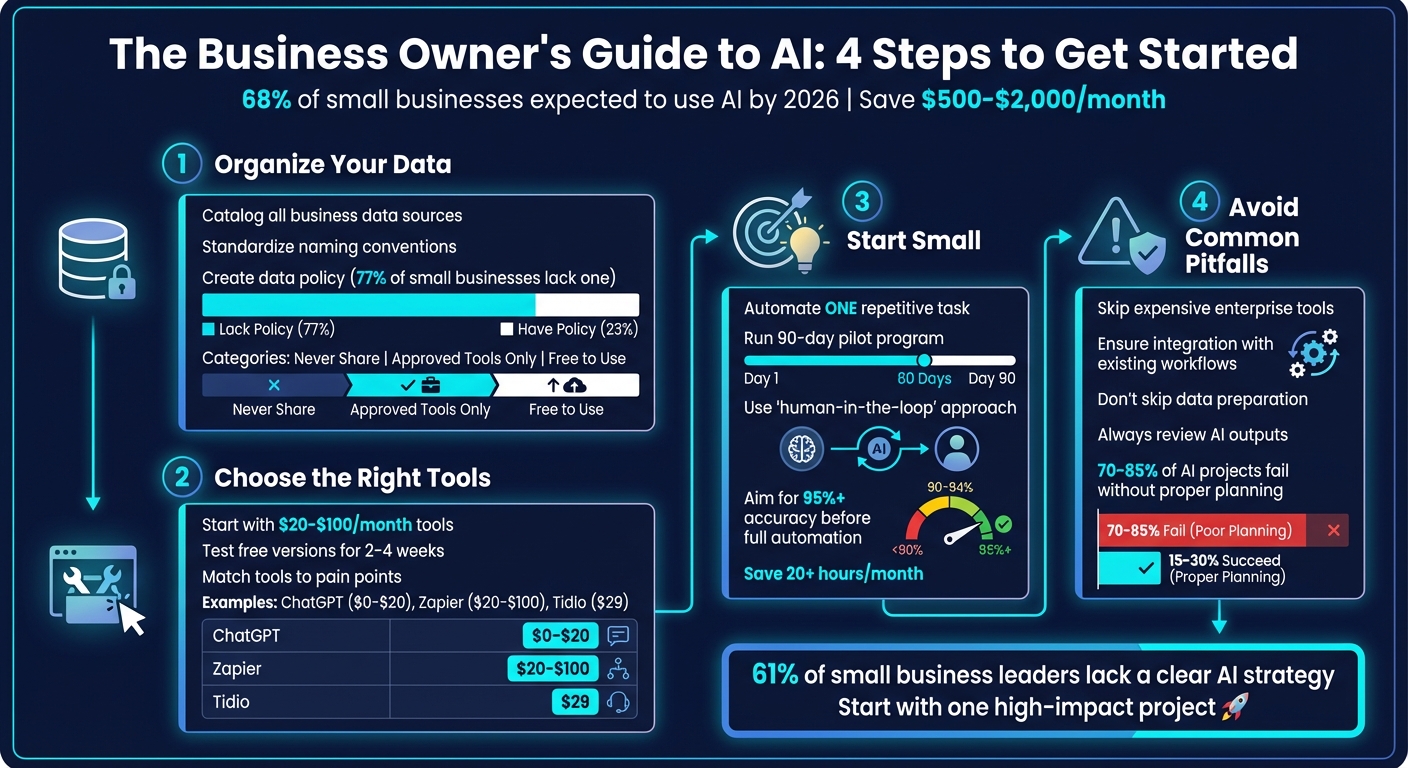
4-Step Guide to Implementing AI in Small Business
How to Automate Any Business With AI in 3 Steps (Beginner's Guide)
sbb-itb-765bc22
Where to Start with AI
Jumping into AI without first organizing your data and processes is like trying to build a house on a shaky foundation. Even the most advanced AI tools can’t fix disorganized data or unclear workflows. Instead, they’ll amplify those problems, potentially making them even more expensive. To get the most out of AI, it’s important to start by streamlining your operations and tackling one challenge at a time.
Before signing up for any AI tools, take a step back. Define the problem you want to solve and make sure your data is in good enough shape to support a solution. Businesses that succeed with AI often start small, focusing on high-impact areas and testing tools on a limited scale before rolling them out more broadly.
Check Your Data First
AI relies on clean, well-organized data. If your information is scattered across spreadsheets, emails, and sticky notes, AI will only make the chaos worse.
Start by cataloging all your business data. This might include sources like Google Analytics, Stripe, CRM systems, emails, Slack messages, or spreadsheets. Then, figure out whether your data is structured (like databases or spreadsheets) or unstructured (like emails, PDFs, and call transcripts). While AI tools are great at analyzing unstructured data, they can only deliver results if the input is accurate and organized.
Before diving into AI, take time to optimize your CRM. Standardize naming conventions, clean up pipeline stages, and verify contact details using tools like email validators. Shockingly, 77% of small businesses using AI lack a written data policy. This often leads to data leaks or incorrect outputs. To avoid this, set up basic data governance by classifying your information into three categories:
- "Never Share": Sensitive data like customer PII or financial records.
- "Approved Tools Only": Anonymized analytics or data for specific platforms.
- "Free to Use": General information for brainstorming or drafts.
By implementing these steps, you can avoid costly mistakes and make your AI setup more efficient.
Once your data is in order, focus on tools that directly address your business challenges.
Pick the Right AI Tools
Don’t get caught up in the hype of trendy AI tools. The best tools are the ones that solve specific, costly problems your business already faces.
For many small businesses, a simple AI setup might include:
- An AI-friendly office suite (e.g., Google Workspace or Microsoft 365)
- A general assistant (like ChatGPT or Claude)
- A website/SEO tool
- An automation platform (such as Zapier or Make)
- A CRM with AI capabilities
This kind of setup generally costs between $20 and $100 per month, but it can save businesses anywhere from $500 to $2,000 monthly in labor costs.
When choosing tools, match your business pain points to the right categories. For example:
- If your customer service team is overwhelmed with emails, consider chatbots like Intercom (around $74/month) or Tidio (about $29/month).
- If your team spends hours taking meeting notes, tools like Otter.ai or Fireflies can help.
- For issues with inconsistent lead follow-up, look for CRM features that automate lead scoring and personalized outreach.
Start by testing free versions of tools like ChatGPT, Claude, or Gemini for 2–4 weeks before committing to a paid plan. This approach can help you avoid costly mistakes. After all, 61% of small business leaders admit they don’t yet have a clear AI strategy.
| Tool Category | Recommended Tools | Best For | Monthly Cost |
|---|---|---|---|
| General Assistant | ChatGPT, Claude, Gemini | Drafting, research, brainstorming | $0–$20 |
| Automation | Zapier, Make, n8n | Connecting apps and workflows | $20–$100+ |
| Customer Service | Intercom, Tidio, Zendesk AI | Handling FAQs and ticket triage | $29–$74+ |
| Operations | Otter.ai, Fireflies, Calendly | Meeting notes and scheduling | $0–$30 |
Once you’ve chosen your tools, focus on small projects that can deliver quick wins.
Start with Small, High-Impact Projects
Your first AI project doesn’t need to be groundbreaking - it just needs to address a repetitive, time-consuming task. Ideally, it should take days, not months, to implement.
To identify the right task, calculate the cost of your most expensive manual process. Multiply the weekly hours spent on it by the hourly rate and then by 52. For instance, if your sales team spends 10 hours a week on lead follow-up at $50 per hour, that adds up to $26,000 per year. Automating this task could save you a significant amount of money.
Start with a “human-in-the-loop” approach, where AI drafts are reviewed before they’re finalized. Once the system consistently achieves over 95% accuracy, you can move to full automation.
Run a 90-day pilot program in one department - Marketing or Customer Service is often a good place to start. Measure the impact in terms of time saved, revenue generated, or headcount reductions. Small businesses that start with clear goals and well-defined projects have reported 27% growth in revenue per employee.
Some common first projects include:
- Sorting and prioritizing customer emails
- Automating meeting summaries
- Scheduling follow-ups based on CRM activity
- Drafting routine customer responses
These kinds of initiatives often save over 20 hours per month and typically cost less than $50/month to implement.
"Your first automation doesn't need to be perfect. It just needs to be better than doing it manually." – Jacob King, King Intelligence
What to Skip
Many business owners lose money on AI by investing in tools they don’t need or by using them poorly. The real issue isn’t picking the wrong tool - it’s skipping the essential groundwork that makes any tool effective. Shockingly, 70% to 85% of AI projects fail, often because companies try to do too much at once or adopt technology without clear goals.
If you want to avoid draining your budget, steer clear of enterprise-level platforms you don’t need, deploying AI without integrating it into your workflows, or rushing into automation without preparing your team and data. Let's explore how to avoid these traps.
Don’t Overspend on Enterprise Tools
Enterprise AI tools are designed for large organizations with big data and dedicated technical teams. For small and medium-sized businesses (SMBs), they’re often unnecessary and expensive.
Take tools like ThoughtSpot Essentials or Tableau Creator as examples. They require technical expertise and large datasets that most SMBs simply don’t have. Similarly, before shelling out $500/month for a premium chatbot, consider whether you’re even handling enough customer inquiries to justify the cost. A large portion (60–70%) of customer service questions are repetitive and can easily be managed with low-cost AI solutions.
"The trouble with using AI to solve a particular problem is that it often comes with significant overhead (i.e. data, talent, compute)."
– Shaw Talebi, Data Scientist
Here’s a simple test: try using free or low-cost tools like ChatGPT’s $20/month plan before committing to expensive, custom-built solutions. If you don’t see value at that level, it’s unlikely that pricier tools will deliver either. Also, don’t jump to higher subscription tiers like “Growth” or “Enterprise” until you’ve proven the return on investment with a cheaper option. Keep in mind that subscription fees only represent 50–65% of the total cost - additional expenses like training, API usage, and workflow adjustments pile up fast.
Don’t Implement AI Without Integration
Even if you choose the right tools, using AI in isolation can derail your efficiency. Tools that require a complete overhaul of your existing systems are a surefire way to waste money. While 68% of small businesses report using AI regularly, only 15–20% have successfully integrated it into workflows that are tracked and measured.
"The fastest way to waste money on AI is to buy tools that require everyone to change how they work."
– Montana Thomas, Quick Sprout
AI should fit into your existing systems - whether it’s your inbox, calendar, or CRM - and not force your team to learn entirely new platforms. Isolated AI systems create what’s known as “integration debt,” where your workflows become heavily dependent on a single vendor. This can lead to sudden disruptions if pricing or features change unexpectedly. On top of that, new AI systems often slow productivity for 2–6 weeks while your team adjusts.
Instead, build a "minimum viable AI stack" - a set of tools that complement your current processes. Look for AI solutions that enhance what you already use, rather than complicating things with separate logins or entirely new systems.
Don’t Skip Preparation
Even the best AI tools will fall flat without proper preparation. Jumping into AI without cleaning up your data or training your team is like trying to build a house on sand. Nearly 95% of companies fail to see returns on generative AI investments because they overlook execution and adoption.
Poor data quality leads to unreliable results. If your team encounters early inaccuracies, they’re less likely to trust or continue using the technology. Messy data can also cause AI to generate inaccurate information or inconsistent messaging, which can harm your brand’s credibility and customer trust.
Before you invest in any AI tool, take time to clean your data by removing duplicates and standardizing field names. Additionally, create a written AI policy that outlines how data can be shared with public AI tools and sets rules for fact-checking AI outputs.
"AI is a tool, not a replacement for your judgment. Every email, every social post, every customer response should be reviewed by a human."
– Jacob King, Founder, King Intelligence
Without this groundwork, AI projects often stall in the pilot phase because the organization lacks the infrastructure or processes to scale them. Establish clear guidelines - like prohibiting the sharing of sensitive data (e.g., customer information or financial records), approving specific tools, and requiring human review before AI-generated content goes live.
What Actually Works
Once you've steered clear of common mistakes, it's time to focus on a few proven AI applications that deliver real results. The key isn't using dozens of tools; it's about mastering a handful - typically 3 to 5 - that address core needs like automating repetitive tasks, analyzing data for informed decisions, and improving customer interactions. These areas consistently show measurable returns.
"AI is not magic and it's not a replacement for a real strategy. What it is: the single best productivity multiplier available to small business owners right now."
– Alex Berman, Founder
Start by identifying tasks that drain the most time or money. Calculate your yearly expenses on manual work (hours per week × hourly cost × 52) and prioritize automating the priciest processes first. Here's a closer look at what works.
Automate Repetitive Tasks
Free up your team by automating time-consuming, routine tasks. AI can handle up to 80% of these, allowing your team to focus on the strategic 20%. Businesses that succeed with AI don’t aim to automate everything - they focus on high-cost activities where AI delivers immediate value.
- Content and Marketing: Tools like ChatGPT, Claude, and Jasper cut drafting time from 2 hours to just 15 minutes, offering a 5–10x return on investment (ROI).
- Customer Support: AI chatbots, such as Intercom and Tidio, resolve up to 70% of customer inquiries and do so 72% faster than traditional methods. These tools typically deliver a 3–5x ROI while boosting customer retention by 20%.
- Lead Generation & Sales: Platforms like Clay, HubSpot, and Smartlead streamline prospect research, personalize outreach, and score leads based on behavior. This approach can improve conversion rates from 13% to 40%, with ROIs as high as 20x.
- Administrative Work: Tools like Otter.ai and Fireflies.ai convert lengthy meetings into searchable transcripts, saving 2–5 hours per person each week. For finance tasks, QuickBooks AI and Xero reduce manual categorization errors.
"Your first automation doesn't need to be perfect. It just needs to be better than doing it manually."
– Jacob King, Founder, King Intelligence
Experiment with free versions of tools like ChatGPT, Claude, or Gemini for 2–4 weeks to determine what suits your needs before investing in paid plans. Create an internal "AI playbook" with effective prompts to ensure consistency and review AI outputs monthly to catch any errors.
| Task Category | Tools | Time/Cost Savings |
|---|---|---|
| Content Creation | ChatGPT, Claude, Jasper | Drafting time: 2 hours → 15 minutes |
| Customer Support | Intercom, Tidio, Zendesk AI | 72% faster resolution; 20% higher retention |
| Lead Generation | Clay, HubSpot, Smartlead | Conversion: 13% → 40% |
| Meeting Transcription | Otter.ai, Fireflies.ai | Saves 2–5 hours/week per person |
| Accounting | QuickBooks AI, Xero | Eliminates manual categorization errors |
Make Better Decisions with AI Data Analysis
AI excels at identifying patterns in data, helping businesses make smarter decisions. Whether it's analyzing customer behavior, pinpointing effective marketing channels, or forecasting finances, AI simplifies complex data analysis while leaving the final call to human judgment.
- Lead Scoring: AI evaluates leads based on factors like company size, industry, and online behavior, enabling sales teams to focus on high-potential prospects. This strategy can raise conversion rates from 13% to nearly 40%.
- Financial Forecasting: AI tools categorize expenses and flag anomalies, reducing an 8-hour task to just 5 minutes. Over half of small business owners say AI-driven cash flow forecasting addresses a major pain point.
- Customer Behavior Analysis: Platforms like Stripe and Google Analytics, paired with AI, identify profitable customer segments, highlight trends in content performance, and flag potential churn risks.
- Competitive Intelligence: For $20–$100 per month, tools like Zapier or Make can monitor competitor pricing, website updates, and social media activity automatically.
"AI is phenomenally good at pattern matching (content, categorization, data analysis). It's terrible at judgment calls, relationships, and strategy."
– Ethan Wilmoth, MEWR Creative
To ensure accuracy, always have a human review AI outputs, especially since 10–20% of data could be misinterpreted. Use tools like Google Gemini or Microsoft Copilot to create detailed charts from simple text prompts. On average, small businesses see $3.70 in returns for every $1 spent on AI.
Improve Customer Interactions
AI isn't here to replace the human touch - it’s here to handle routine inquiries so your team can focus on meaningful interactions. Businesses are using AI to manage initial customer engagement, with complex issues quickly escalated to human representatives.
- Chatbots & Virtual Assistants: These tools provide instant, 24/7 responses for FAQs, shipping updates, and returns. They can handle up to 70% of inquiries automatically, resolving them 72% faster and increasing customer retention by 20%.
- Personalized Outreach: Tools like Lavender, Smartlead, and Instantly craft customized email content and delivery schedules based on user behavior, doubling or tripling open and reply rates.
- Automated Follow-ups: Systems that send prompt, tailored follow-ups significantly boost conversion rates, especially when responses are delivered within 5 minutes.
- Sentiment & Tone Matching: Advanced chatbots can mimic your brand's voice, ensuring a seamless experience whether customers interact with AI or a human.
"The businesses that will thrive are not the ones with the most AI tools. They are the ones using AI to reclaim time for the work that actually matters: strategy, relationships, and growth."
– Kiara Foster, Head of Content, digitalpractice.com
To measure success, monitor your deflection rate - the percentage of inquiries resolved by AI versus those requiring human intervention - and regularly review chatbot interactions to prevent misinformation.
The takeaway? A staggering 91% of small businesses using AI report revenue growth compared to those that don't.
How to Get Started
Forget lengthy plans - kick things off with a 5-day sprint. Here's how:
- Monday: Write down all your repetitive tasks and pick the top three time-drainers.
- Tuesday: Sign up for a free AI assistant like ChatGPT, Claude, or Gemini, and draft five routine emails.
- Wednesday: Track how much time you spend daily on lead follow-ups. If it’s over an hour, flag that process for improvement.
- Thursday: Look into automation tools like Zapier or Make to streamline your most time-consuming task.
- Friday: Decide whether to tackle the first implementation yourself or hire a consultant for support.
Once your sprint is done, focus on one high-impact process for automation. Don’t try to change everything at once - pick a single pilot project. To assess its potential, calculate the yearly cost of handling that task manually: hours per week × hourly cost × 52. For instance, if answering customer FAQs eats up $8,000 annually, that’s a prime candidate for automation. Run your pilot for 90 days. Many businesses break even by weeks 5–8 and start seeing clear benefits by week 12.
Keep humans involved. AI can handle the first 80% of a task, but leave the final 20% to a person to catch errors and maintain your brand’s tone. Also, anonymize sensitive data before using public AI tools to protect privacy.
Create a Minimum Viable AI Policy - a short document (3–5 pages) that defines what data must stay private, which tools are approved, and when human oversight is mandatory. Right now, 77% of small businesses using AI don’t have such a policy, which increases their risk of data breaches and mistakes. A clear policy ensures you're set up to measure results effectively.
"AI won't fix a broken business model. It won't make up for a bad product. What it will do is remove friction from the things that are already working. Think of it as a multiplier, not a miracle."
– Jacob King, Founder, King Intelligence
Small businesses can save over 20 hours and $500–$2,000 each month by starting with a free tool to tackle just one expensive, manual task. Scale up once you see results - this is how AI delivers meaningful business outcomes.
FAQs
What’s the first AI task I should automate in my business?
Start by tackling repetitive customer interactions that consume valuable time. Focus on automating tasks like answering frequently asked questions, capturing leads, and scheduling appointments. These are straightforward to set up and can immediately save time while increasing revenue. For example, automating lead responses and follow-up emails not only minimizes manual work but also enhances the customer experience, laying the groundwork for expanding AI solutions in the future.
How can I keep customer data secure when using AI tools?
To keep customer data safe while working with AI tools, it's important to have strict access controls in place, ensuring only authorized individuals can view or handle sensitive information. Make sure your processes align with data protection laws, like GDPR or CCPA, and actively monitor for any signs of breaches or vulnerabilities.
Using AI-driven cybersecurity tools can also help identify and address threats quickly. Look for tools that come with built-in security measures, and always follow responsible AI practices. Focusing on privacy and minimizing risks not only protects data but also helps build trust with your customers.
How do I prove an AI tool is worth paying for?
Focusing on measurable outcomes is key when assessing the impact of AI. Look at areas where it can directly save time, boost efficiency, or drive revenue growth. For example, track how AI automates specific tasks - like handling customer inquiries or generating content - and calculate the hours saved or the increase in output.
Start by targeting high-impact areas such as marketing or customer service, where improvements are often more noticeable. Compare metrics from before and after implementing AI. Did response times shrink? Was there an uptick in sales? Use these benchmarks to highlight the results.
Document concrete benefits like cutting down on manual labor, speeding up processes, or increasing revenue. These tangible outcomes make it easier to showcase a clear return on investment (ROI).