
The Startup Founder's Guide to AI Business Automation
AI business automation is no longer optional - it’s a must-have for startups aiming to scale efficiently. By automating repetitive tasks, startups can save time, reduce costs, and increase productivity without adding headcount. For example:
- Customer Support: AI chatbots resolve up to 80% of queries, cutting support costs by 50%.
- Marketing: Automations like lead scoring and email personalization boost conversion rates by 30%.
- Operations: No-code tools like Zapier streamline workflows, saving 15+ hours weekly.
In 2025, companies like Remote and Popl saved thousands of hours and dollars by integrating AI tools like ChatGPT and Zapier into their processes. Whether it’s automating customer inquiries or routing sales leads, AI offers scalable solutions tailored to your startup’s needs. Implementing AI starts with identifying bottlenecks, selecting the right tools, and scaling gradually while measuring ROI.
The question isn’t if you should automate - it’s how soon you can start.
These 4 AI Automations Will Make You $1M (With Zero Employees)
Finding Automation Opportunities in Your Startup
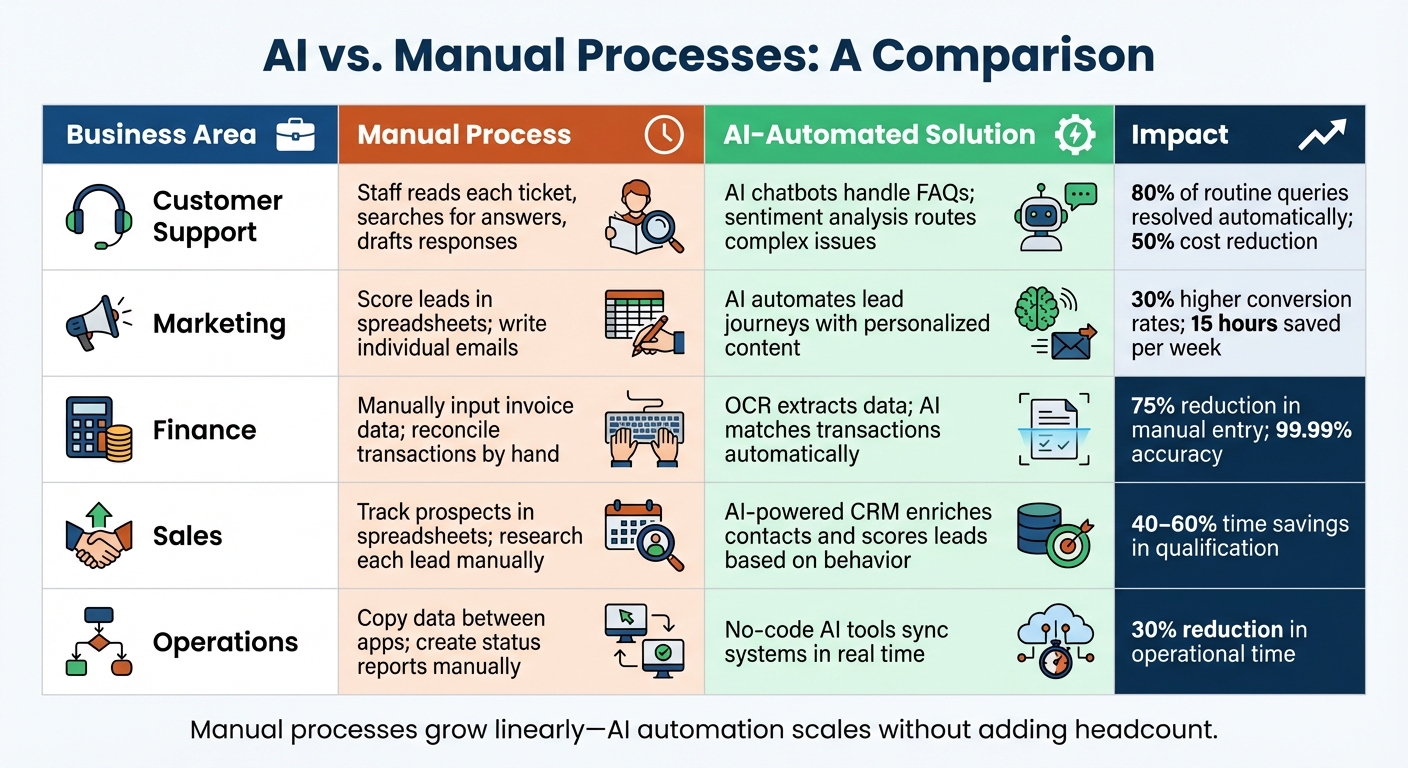
AI Automation vs Manual Processes: Time Savings and Cost Reduction Comparison
Pinpoint the bottlenecks that sap your team's energy and slow down growth. Instead of trying to automate everything at once, zero in on specific pain points that are dragging your startup down.
Start by tracking your team's weekly activities. Look for tasks that feel like they could be handed off to a "smart intern" - repetitive, rule-based jobs that don’t require much human judgment. Think about things like copying data between your CRM and spreadsheets, sorting support tickets, or manually qualifying inbound leads.
A big warning sign is when your employees are acting as "human bridges" between software platforms. If someone is constantly transferring data from one app to another, your team is paying a coordination tax that only grows as you scale. For example, knowledge workers already spend an average of 11 hours a week managing emails, and tasks like data entry, invoice processing, and scheduling meetings just add to the pile.
Common Startup Problems
Early-stage startups often face three big operational hurdles, each of which presents a chance to bring in AI automation.
Slow customer support is a common challenge. Take Remote, a global employment platform. In 2025, their three-person IT team was swamped with 1,100 support tickets every month. By rolling out an AI system that combined ChatGPT for issue classification with Zapier Agents to suggest solutions based on previous tickets, they automated 28% of requests and freed up over 600 hours per month.
Manual marketing tasks can also drain resources. Popl, a digital business card startup, used to handle hundreds of daily demo requests manually through HubSpot. By late 2025, they introduced OpenAI to filter spam, enrich lead data, and route legitimate requests to the right sales reps based on region. This saved them $20,000 annually across more than 100 workflows.
Inefficient project management can be another roadblock. ActiveCampaign found that 25% of new users were dropping off during onboarding. To fix this, they built an AI-driven system that tagged signups by language and enrolled them in tailored webinars. This boosted webinar attendance by 440% and cut early churn by 15%.
AI vs. Manual Processes: A Comparison
The benefits of AI automation go beyond just speed. It’s also about scalability and consistency. Here’s how manual processes stack up against AI-powered solutions:
| Business Area | Manual Process | AI-Automated Solution | Impact |
|---|---|---|---|
| Customer Support | Staff reads each ticket, searches for answers, drafts responses | AI chatbots handle FAQs; sentiment analysis routes complex issues | 80% of routine queries resolved automatically; 50% cost reduction |
| Marketing | Score leads in spreadsheets; write individual emails | AI automates lead journeys with personalized content | 30% higher conversion rates; 15 hours saved per week |
| Finance | Manually input invoice data; reconcile transactions by hand | OCR extracts data; AI matches transactions automatically | 75% reduction in manual entry; 99.99% accuracy |
| Sales | Track prospects in spreadsheets; research each lead manually | AI-powered CRM enriches contacts and scores leads based on behavior | 40–60% time savings in qualification |
| Operations | Copy data between apps; create status reports manually | No-code AI tools sync systems in real time | 30% reduction in operational time |
Manual processes grow linearly - more tasks usually mean hiring more people. AI automation, on the other hand, can handle growing workloads without adding headcount. For lean startup teams, this difference could determine whether you stay nimble or get bogged down by operational headaches.
"The real value comes when you automate entire processes - scaling what your team does best and unlocking 'infinite time' for the work only humans can do."
- Rachel Woods, Founder, DiviUp
Instead of hiring more people to manage operational chaos, focus on automating coordination tasks like status updates, task routing, and data syncing. Next, we’ll explore the top AI tools that can help you achieve these efficiencies.
Top AI Tools for Startup Automation
Streamline your startup operations by using platforms that handle essential tasks like customer support, marketing, and workflow management. Below, we highlight some of the best tools tailored to meet these needs.
Customer support tools are a game-changer for startups, especially in e-commerce. Tools like Gorgias integrate seamlessly with Shopify, BigCommerce, and Magento, automating common order inquiries. For enterprise-level startups, Zendesk offers advanced reporting features and multi-channel support, starting at $49 per user per month. SaaS companies often turn to Intercom, which uses existing help documentation to power AI chatbots, reducing the load on live agents. Additionally, Freshdesk provides a free plan for up to 10 agents, making it a budget-friendly option for growing teams.
Marketing automation tools are essential for scaling outreach and content creation. Platforms like Jasper and Copy.ai (pro plan at $49/month) simplify copywriting tasks, while HubSpot AI (starting at $15/month per seat) offers predictive lead scoring and tools for generating scalable content. For startups focused on visual marketing, Pictory transforms text into engaging social media videos (starting at $19/month for 200 video minutes). Meanwhile, Canva speeds up design tasks with its AI-driven templates, making professional-quality visuals accessible to anyone.
Workflow management tools ensure smooth operations by connecting apps and automating data transfers without the need for developers. Platforms like Zapier and Make allow startups to create complex workflows effortlessly. Depending on your needs, investing $50 to $500 per month in these tools can significantly boost efficiency and deliver measurable returns over time.
Integrating AI Tools with ZipLyne for Faster Execution
The AI tools we’ve discussed - like Zapier, HubSpot, and ClickUp - are powerful on their own. But their true power shines when they’re integrated into custom workflows tailored to your startup's unique needs. That’s where ZipLyne comes in. Instead of just linking a few apps, ZipLyne acts as the orchestration layer, seamlessly connecting people, tools, and AI agents to create systems designed for speed and scalability.
AI orchestration platforms make it possible to embed intelligence into your existing workflows. By connecting tools such as Slack, Salesforce, and HubSpot, these platforms automate repetitive tasks. ZipLyne takes this a step further by creating judgment-based automation - workflows that not only automate tasks but also interpret context and adapt decisions. For instance, imagine you’re dealing with hundreds of inbound sales emails. Instead of manually sorting through them, ZipLyne can set up a system that uses OpenAI to classify leads, pull enriched data from your CRM, and route high-value prospects to the appropriate sales rep - all without lifting a finger.
Here’s a real-world example: In 2025, Popl integrated Zapier and OpenAI to verify lead information, notify teams via Slack, and route leads based on region and company size. By automating the triage process and filtering out spam, Popl significantly streamlined its operations.
"It's not just about doing more. It's about doing it better, faster, and with fewer resources." - Jason Alvarez-Cohen, CEO of Popl
ZipLyne also excels at rapid MVP development through no-code platforms like Zapier, enabling startups to build internal AI tools without needing to write any code. This approach allows for quicker experimentation and iteration - essential for startups working under tight deadlines and budgets. Whether it’s an AI-powered help desk that resolves 28% of support tickets automatically (as Remote did, saving over 600 hours monthly) or a customer success system that boosts webinar attendance by 440% (as ActiveCampaign achieved), ZipLyne can design and deploy these systems in just weeks, not months. This kind of integration lays the groundwork for comprehensive automation, driving rapid execution across all areas of your business.
How ZipLyne Works with AI Tools
ZipLyne doesn’t just connect your tools - it transforms how you work. By creating end-to-end automation solutions, it helps save time, cut costs, and scale operations. Here’s a closer look at how workflows are customized and enhanced with AI integrations:
| Workflow Category | Specific Process Customization | AI Tool Integration Example |
|---|---|---|
| Sales & Lead Gen | Lead scoring, automated follow-ups, CRM routing | Zapier + HubSpot + OpenAI |
| Customer Support | Sentiment analysis, ticket prioritization, auto-replies | Zapier + Slack + ChatGPT |
| Operations | Meeting summaries, automated task creation | Zapier + Zoom + ClickUp/Notion |
| Marketing | SEO brief creation, social media scheduling | Zapier + Google Docs + OpenAI |
| IT & Data | Knowledge base updates, user context retrieval | Zapier + Okta + Notion |
These integrations go beyond just linking apps. They’re about building “agentic” workflows, where AI agents can plan, evaluate their own performance, and adjust their actions to meet broader goals. To ensure quality and control, ZipLyne incorporates human-in-the-loop checkpoints for tasks that require sensitivity. This allows AI to gather context and make recommendations while leaving final decisions to humans. The result? Faster workflows without compromising on precision or oversight.
sbb-itb-765bc22
Step-by-Step Guide to Implementing AI Automation
Implementing AI automation isn’t something you can rush. It requires careful planning, testing, and ongoing adjustments. Start small, measure your results, and scale what works. Let’s break it down.
Step 1: Audit Your Current Processes
Before diving into automation, take a close look at your current workflows. This step is all about clarity - document every part of your manual processes: who’s involved, what inputs are needed, what actions are taken, and what the outputs look like. Think of this as creating a roadmap for where automation can make the most impact.
Focus on tasks that are repetitive, follow clear rules, or involve a high volume of work. For example, things like sorting emails, transferring data between systems, scheduling meetings, or routing customer inquiries are prime candidates. During this initial audit, most teams uncover 15–20 areas ripe for automation.
To decide where to start, try an Effort vs. ROI Matrix. Evaluate each task based on how much time it takes now and how complex it would be to automate. This will help you identify "Quick Wins" (low-effort, high-impact tasks) and "Strategic Bets" (more complex but worth the investment). For startups, it’s smart to prioritize workflows that directly affect customers or bring in revenue.
One thing to keep in mind: automation works best with clean, structured inputs. If your data is messy or inconsistent, fix that first. Also, involve the team members who deal with these tasks daily - they’ll often point out real-world quirks that don’t show up in official process documents.
Take VEV, a Norwegian telecom company, as an example. In 2025, they used Salesforce’s Agentforce 360 to streamline their customer service workflows. By automating repetitive tasks, they managed to resolve 30% of support cases automatically and sped up the resolution of the remaining cases by 40%.
This audit lays the groundwork for choosing and testing the right AI tools.
Step 2: Select and Test AI Tools
Once you’ve mapped out your processes, it’s time to pick the right tools. The key is matching the tool to the task. For instance, use Natural Language Processing (NLP) for handling unstructured text (like emails), Machine Learning for dynamic decision-making, or Robotic Process Automation (RPA) for structured, rules-based tasks. Opt for tools with user-friendly interfaces to reduce training time.
Integration is another big factor. Look for tools that can connect seamlessly with your existing systems - whether it’s your CRM, project management software, or communication platforms. Startups in industries like finance or healthcare should also ensure compliance with regulations like SOC 2, GDPR, and HIPAA. Many tools offer free plans or affordable options, with initial costs ranging from $50 to $500 per month.
Testing is crucial. Set up a test environment that mirrors your real workflows, using sample data and dedicated test accounts. Be sure to include real-world imperfections, such as typos or missing fields, to see how the tool performs under less-than-ideal conditions. Run a short pilot (4–6 weeks) on a low-risk, high-volume process - something like email triage - and track key metrics like turnaround time, accuracy, and error rates.
"Simple tools that work reliably beat complex tools that work sometimes." - Superhuman Team
To keep things running smoothly, assign a dedicated Tool Champion to handle setup and troubleshoot any issues.
Step 3: Monitor and Scale Automation
Automation isn’t a “set it and forget it” solution. It needs constant monitoring. Keep detailed logs of inputs, outputs, and processing times for every workflow. This helps you catch bottlenecks before they cause problems. Set up alerts to flag any dips in performance metrics like accuracy or speed.
Use the CRAFT Cycle - Clear Picture, Realistic Design, AI-ify, Feedback, and Team Rollout. This iterative process ensures your automation adapts as your business grows. Check in weekly to address immediate concerns, review performance monthly, and plan for broader implementation every quarter.
Start small and build up. Begin with simple, low-risk automations, like summarizing meeting notes, and expand as your team becomes more comfortable. Tackle Quick Wins first, then move on to more challenging workflows. As your automation efforts grow, consider assigning specific roles, like an AI Operator to oversee ongoing improvements and an AI Implementer to manage integrations.
Measure the ROI of your automation by calculating time saved, hourly rates, and costs. For instance, in 2025, Remote scaled to 1,800 employees with just a three-person IT team. By automating 28% of their support tickets using Zapier and ChatGPT, they saved over 600 hours each month.
"Revisit 'failed' use cases every ~6 months - models improve quickly, and yesterday's misses can become tomorrow's wins." - Bessemer Venture Partners
Here’s a general timeline for scaling:
| Scaling Phase | Timeline | Scope |
|---|---|---|
| Phase 1 | Weeks 1–4 | One team, one visible workflow (Pilot) |
| Phase 2 | Weeks 5–12 | Whole department, 3–5 workflows |
| Phase 3 | Weeks 13+ | Cross-functional, standardized processes |
These steps align with ZipLyne’s strategy for fast, integrated AI automation. By following this approach, you can implement automation that’s efficient, scalable, and aligned with your business goals.
Measuring ROI and Scaling AI Automation
After identifying areas for automation, the next step is measuring ROI and planning for scalable, tailored AI solutions. Once your automation is up and running, evaluating its ROI is crucial to guide further investments. The global AI market is expected to hit $757.58 billion by 2025.
Key Metrics to Track
To assess the success of your AI initiatives, focus on metrics like throughput, automation rates, and error reduction. For example, 56% of companies using AI in daily operations report a 30% reduction in time spent on tasks.
Financial metrics are equally important. Start by calculating your cost per task before and after automation. Then, evaluate your annual operational savings and any changes in customer acquisition costs (CAC). A helpful formula to measure impact is: (Time Saved × Hourly Rate × Frequency) - (Platform Costs + Setup Time). For instance, in 2025, Popl utilized Zapier and OpenAI to automate lead triage, effectively filtering spam and routing demo requests without manual intervention.
Customer-facing metrics also offer valuable insights. Track response times, resolution rates, and Net Promoter Score (NPS) improvements. AI chatbots, for instance, can resolve up to 80% of customer queries, cutting support costs by 50%. When VEV, a Norwegian telecom company, adopted Agentforce 360 in mid-2025, they automated 30% of support cases and handled the remaining ones 40% faster.
Employee productivity is another area to measure. Look at time saved per employee, the frequency of human intervention, and reductions in coordination overhead.
"Measuring AI success is essential for ensuring alignment with business goals, driving long-term value, empowering data-driven decision-making, and optimizing performance."
- Asong Suh, Managing Director, Sand Technologies
Before implementing AI, establish a baseline by measuring your current error rates, response times, and costs. This allows you to accurately quantify the impact of automation. Set confidence thresholds to ensure quality - automate tasks only when AI confidence reaches 95% or higher, and send lower-confidence outputs to humans for review. This approach minimizes errors and ensures reliability.
Here’s a comparison of traditional automation versus AI-powered automation:
| Metric Category | Traditional Automation | AI-Powered Automation |
|---|---|---|
| Logic Type | Deterministic (if X, then Y) | Probabilistic (learns and adapts) |
| Data Handling | Structured data only | Works with unstructured data (emails, voice) |
| Flexibility | Rigid; fails with format changes | Adapts to new templates and contexts |
| Decision Making | Rule-based; no judgment | Interprets tone, intent, and sentiment |
Regularly revisit automation use cases that previously didn’t work. AI models improve rapidly, so what failed last quarter might now be feasible.
Scaling with Custom AI Solutions
While off-the-shelf tools are great for getting started, custom AI solutions can take your business to the next level. Generic tools often fall short when it comes to capturing your brand voice, handling specific workflows, or leveraging proprietary data. Custom solutions allow you to automate entire processes rather than isolated tasks. For instance, instead of just using ChatGPT to draft emails, you could develop a system that scans resumes, extracts skills, matches candidates to roles, and drafts personalized outreach - all in one seamless workflow.
"The real value comes when you automate entire processes - scaling what your team does best and unlocking 'infinite time' for the work only humans can do."
- Rachel Woods, Founder, DiviUp
Companies like ZipLyne specialize in creating these tailored AI solutions. Whether it’s AI trained on your internal knowledge base, custom agents for multi-step workflows, or integrations that connect your entire tech stack, these solutions ensure your automation grows with your business while maintaining your brand standards. This leads to measurable ROI and long-term scalability.
When scaling, focus on incremental delegation. Start by automating small, manageable parts of a process, then expand as confidence in the system grows. Keep humans involved for high-stakes decisions - use AI to gather data and suggest actions, but let your team handle tasks that require judgment or nuance. Track "enablement" metrics to identify new capabilities made possible by AI, such as scaling personalized product demos or analyzing thousands of customer calls, which were previously unfeasible.
"AI offers arbitrage across workflows and gives internal business users technical superpowers."
- Nick Scavone, CEO, Seam AI
To control costs, set API spending alerts at $50, $100, and $200 thresholds. Standardize your inputs by incorporating data-cleaning steps into workflows, ensuring the AI processes consistent, structured information. Remember, 70% of challenges in scaling AI stem from people and process issues, not technology. Investing in training, establishing clear governance, and centralizing oversight can help avoid "shadow AI" and ensure sustainable growth.
Custom AI solutions can deliver tangible savings and productivity boosts. Small businesses, for example, can save up to 15 hours per week by automating routine tasks, while AI can reduce operational costs by around 30%. With the right metrics and tailored solutions, your business can scale faster and achieve greater efficiency.
Conclusion: Growing Your Startup with AI Automation
AI automation has the power to reshape how your startup operates, delivering measurable results and streamlining growth. By cutting costs and removing coordination hurdles, it allows you to scale efficiently. Instead of hiring additional coordinators to manage growth, you can automate those processes and redirect your team’s energy toward revenue-driving activities and strategic decisions.
With AI, your team can save up to 15 hours a week, reduce expenses by 30%, and handle 80% of routine inquiries. This not only boosts efficiency but also gives your startup the output capacity of a larger organization - all while keeping the flexibility of a lean team.
"The real value comes when you automate entire processes - scaling what your team does best and unlocking 'infinite time' for the work only humans can do."
- Rachel Woods, Founder, DiviUp
Don’t dismiss past automation efforts that didn’t pan out - AI evolves quickly, and what wasn’t possible six months ago might be a game-changer today.
ZipLyne offers custom AI solutions tailored to your unique needs. These tools integrate seamlessly with your operations, capturing your brand’s voice, managing intricate workflows, and scaling alongside your business. Whether it’s training AI on your internal resources or creating multi-step agents to unify your tech stack, these solutions deliver real, measurable growth. The real question isn’t whether to use AI automation - it’s how soon you can get started. Embrace this shift to fuel growth and take your operations to the next level.
FAQs
How can AI automation improve customer support for startups?
AI automation has the potential to revolutionize customer support for startups by making operations faster, more efficient, and budget-friendly. With tools like chatbots, generative AI assistants, and predictive routing, businesses can manage inquiries around the clock, cut down response times, and resolve common issues instantly. This means even a small team can deliver quick and professional service to customers.
By taking over routine tasks, AI can handle up to 40% of support tickets, freeing up human agents to tackle more complex challenges. It also ensures consistent, data-driven responses that boost customer satisfaction while keeping costs in check. These advantages allow startups to expand their support capabilities without needing to hire a large team, leaving more resources available for growth and new opportunities.
How can a startup identify opportunities for AI-driven automation?
Start by taking a close look at your current operations to pinpoint tasks that eat up time and follow predictable patterns. These could include things like data entry, invoice processing, or sorting through emails. For a better understanding, calculate the weekly time spent on these tasks and their cost. For example, if a task takes 10 hours a week and the hourly rate is $30, that’s $300 per week. Focus on tasks that are repetitive, high in volume, and don’t directly involve customer interactions.
Once you’ve identified these tasks, map them out within your workflows to understand how they fit into larger processes. Prioritize automation opportunities that check three boxes: they’re repetitive, their benefits can be measured (like saving time or reducing errors), and they have minimal customer impact if something goes wrong. Start small by choosing one or two tasks that are both impactful and low-risk to test automation.
Before diving in, validate your plan with key team members, such as product and operations leaders, to ensure it aligns with your business objectives and available data. A small-scale test - like trying a chatbot for lead follow-ups or automating routine invoice work - can deliver clear results and set the stage for expanding AI across other areas.
What are the best AI tools for automating marketing tasks in a startup?
Startups have access to a range of AI tools that can handle essential marketing tasks, helping them save time, cut costs, and achieve better results.
- Pitch Avatar: This AI-powered conversational assistant turns static presentations into dynamic, interactive experiences. It’s a game-changer for engaging prospects, qualifying leads, and managing outreach across email, chat, and social platforms.
- ITCOMMS AI Press Release Generator: Need a polished press release but don’t have a dedicated writer? This tool drafts professional PR content quickly, ensuring consistent media communication without the hassle.
- HubSpot AI Features: HubSpot’s suite of AI tools simplifies campaign work with pre-built prompts that generate ad copy, email subject lines, and social media calendars. Everything integrates smoothly into your existing campaigns, making updates and iterations a breeze.
These tools tackle key marketing challenges like lead generation, content creation, and campaign management, enabling startups to grow effectively without stretching their resources too thin.