
AI Automation for Traditional Businesses: A Step-by-Step Transformation Guide
AI automation can save businesses time, reduce costs, and improve efficiency. Employees spend 50% of their time on repetitive tasks, and AI can reclaim 3.5 hours per week per worker while boosting overall time savings by 28%. This guide breaks down how to effectively implement AI in your business operations.
Key Steps:
- Audit Current Processes: Map workflows to identify repetitive and error-prone tasks.
- Set Measurable Goals: Use specific metrics like cost reduction or time saved.
- Run a Pilot Program: Test AI tools on a small scale to refine processes.
- Train Your Team: Ensure employees understand and trust the automation.
- Expand Strategically: Scale AI to other workflows while continuously monitoring and improving.
AI isn't about replacing workers but freeing them from tedious tasks to focus on higher-value work. With the right approach, you can achieve measurable results within 18 months.
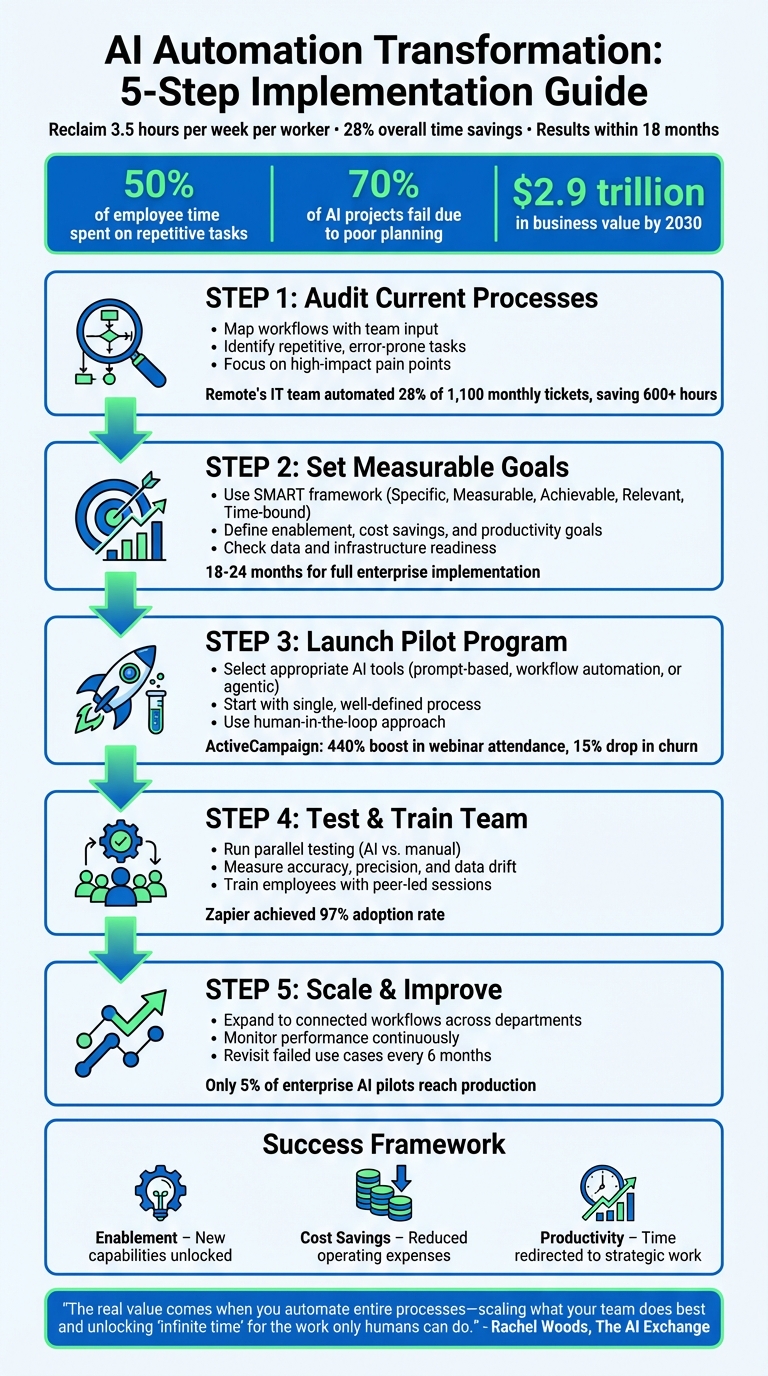
5-Step AI Automation Implementation Process for Traditional Businesses
How to Automate Any Business With AI in 3 Steps (Beginner's Guide)
Step 1: Review Your Current Processes and Find Automation Opportunities
Start by documenting your daily workflows. The best way to do this? Talk to the people who handle these tasks every day. They’re the ones who see where things slow down or break entirely.
Conduct a Workflow Audit
Bring your team together and map out each process step by step. Keep it simple - use sticky notes on a whiteboard to lay out the current "as-is" workflow. This hands-on approach gives you a clear, visual picture of how things work without relying on complicated tools.
"RECORD AND MAP ALL OF YOUR PROCESSES BEFORE YOU START CHANGING THEM. ... make sure you get a complete and accurate picture of your business process before you start making changes." - Sean Martin, Marketing Manager
You can also use frameworks like SIPOC or the 7 R’s of Process Innovation to dig deeper. Work backward from the outcomes you want to the inputs required, making sure every step adds real value.
Once you’ve mapped everything out, you’ll be able to see where AI could make the most difference.
Identify High-Impact Opportunities
Now, analyze your workflow map to find tasks that are repetitive, prone to errors, or time-consuming. These are the best candidates for automation. Think of tasks like filtering emails, summarizing meeting notes, or organizing messy data. Here’s an example: In late 2025, Remote’s IT team automated 28% of their 1,100 monthly support tickets using AI. This saved their three-person team more than 600 hours each month.
"The first process selected to be mapped should be the largest pain point in the business which restricts revenue generation." - Ray McKenzie, Founder and Principal, Red Beach Advisors
Focus on areas where delays or inefficiencies are common, or where better insights could make a big difference for employees or customers. High-impact tasks often include invoicing, customer onboarding, lead follow-ups, and internal reporting. Starting with internal processes - like HR or reporting - can be a smart move. It allows you to refine your approach without risking customer satisfaction. And remember, always fix broken processes before automating them.
Step 2: Set Business Goals and Success Metrics
Once you've pinpointed areas where automation can make a difference, it's time to connect those opportunities to specific business outcomes. Why? Because without clear goals, it’s impossible to measure whether your AI investment is paying off. And here's the kicker: about 70% of AI projects fail due to poor strategic alignment and lack of planning. You don’t want to end up in that statistic.
Define Measurable Goals
To get the most out of your AI investments, align automation opportunities with goals that are easy to measure. A great way to do this is by using the SMART framework - set goals that are Specific, Measurable, Achievable, Relevant, and Time-bound. For instance, instead of a vague goal like "improve customer service", aim for something like "reduce average customer response time from 4 hours to 90 minutes within 6 months."
Break your goals into categories like:
- Enablement: What new capabilities can your team achieve with AI that weren’t possible before?
- Cost Savings: How much can you cut from operating expenses?
- Productivity: How much time can be redirected to higher-value, strategic work?
These measurable improvements don’t just boost efficiency - they also lead to financial gains. For example, automated notifications can speed up response times, creating smoother workflows.
"AI offers arbitrage across workflows and gives internal business users technical superpowers." - Nick Scavone, CEO, Seam AI
To track progress, focus on both operational and financial metrics. For operational efficiency, look at task completion times and error rates. For customer experience, monitor response times and satisfaction scores. On the financial side, measure cost reductions and the time saved for more strategic work. Done right, AI has the potential to generate $2.9 trillion in business value by 2030 - but only if you track the right metrics.
Before moving forward, make sure your systems are ready to support these goals.
Check Infrastructure and Data Readiness
Your AI initiatives will only be as strong as the foundation they’re built on. Start with your data. Evaluate it across four key dimensions:
- Completeness: Do you have all the information you need?
- Accuracy: Is the data correct?
- Consistency: Does it align across all systems?
- Timeliness: Is it up to date?
If your data isn’t consolidated or current, AI performance will suffer.
Next, examine your technical infrastructure. Does your existing setup have the computing power AI demands? For many businesses, cloud-based solutions are a practical choice - they offer scalability without requiring massive upfront investments. On-premises systems, while offering more control, demand significant IT resources. A hybrid approach can strike a balance between the two.
Also, ensure that any new AI tools can integrate seamlessly with your current systems, such as your CRM, ERP, or accounting software. Look for tools with strong APIs and pre-built connectors. Having an integrated system can make the transition to AI-powered operations much smoother. While full enterprise AI implementation typically takes 18 to 24 months, starting with a solid infrastructure can shorten that timeline significantly.
Don’t forget to address data privacy and compliance requirements, like GDPR or HIPAA, before rolling out AI solutions. Establishing clear policies upfront can save you from costly issues down the road.
With your goals set and your technical foundation in place, you’re ready to explore and test the right AI tools.
Step 3: Choose and Configure AI Tools for a Pilot Program
Now that you've completed your process audit and set clear objectives, it's time to bring AI into the picture with a pilot program. By starting small and testing the waters, you can demonstrate the potential of automation while fine-tuning your approach. As Rachel Woods puts it, "The real value comes when you automate entire processes", but the first step is proving that your concept works. This phase helps you choose the right tools and focus your efforts on a well-defined pilot.
Select the Right AI Tools
Picking the right AI tools starts with identifying the kind of automation you need. For instance:
- Prompt-based tools like ChatGPT are great for tasks like drafting emails or brainstorming ideas.
- Workflow automation platforms such as Zapier or Airtable shine when managing repetitive sequences like lead routing or data entry.
- Agentic AI tools can autonomously handle more complex, multi-step problem-solving.
Start with small, high-impact automations that yield quick results. Ideal candidates are repetitive tasks that still require some human input, like triaging support tickets or summarizing customer feedback. A great example comes from 2025, when Popl used Zapier and OpenAI to streamline their sales pipeline. By automating the triage of inbound emails, filtering spam, and routing leads to the right representatives, they saved $20,000 annually.
When assessing tools, keep three key factors in mind:
- Integration capabilities: Does the tool work with your existing systems like your CRM, ERP, or accounting software?
- Security and compliance: Can it meet industry standards like GDPR or HIPAA?
- Analytics features: Does it provide insights to track performance and identify problems?
Adopting the mindset of "own the playbook, rent the tech" can also be helpful. Document your processes thoroughly so you can easily switch tools as technology evolves.
Launch a Pilot Program
After selecting your tool, kick off a pilot program focused on a single, clearly defined process. Use the CRAFT Cycle framework to guide you:
- Start by mapping out your current process.
- Create a minimum viable solution.
- "AI-ify" the process by building the automation.
- Gather feedback through testing.
- Prepare for a broader rollout.
Begin with partial automation and include human oversight. Clearly define rules for data storage, training usage, and error handling.
For example, in 2025, Remote’s three-person IT team used ChatGPT and Zapier to manage 1,100 monthly support tickets for 1,800 employees. They automated 28% of cases, saving over 600 hours. Similarly, ActiveCampaign tackled a 25% churn rate by using AI to tag new signups by language and enroll them in relevant webinars automatically. The result? A 440% boost in webinar attendance and a 15% drop in early churn.
Design your pilot with a "human-in-the-loop" approach. Let the AI handle the initial steps, while humans review and refine the output. Track errors using a "Clear, Actionable, and Necessary" framework, and focus on improving initial prompts instead of overloading them with extra context. This iterative process, guided by human oversight, is key to turning your pilot into a scalable solution.
sbb-itb-765bc22
Step 4: Test, Validate, and Train Your Team
After completing your pilot, it's time to validate how well the AI performs and prepare your team for the transition. Thorough testing and proper training are critical to ensure the automation works effectively and gains buy-in from your employees.
Run Parallel Testing
Test your AI by running it alongside your current manual workflow. This lets you directly compare accuracy, speed, and efficiency between the two approaches. Running these processes in tandem helps pinpoint errors, uncover edge cases, and fine-tune the automation before a full-scale rollout.
Start by defining your "ideal process" as a benchmark. Then, feed real-world daily inputs into the AI system and evaluate its performance against clear criteria. Measure accuracy (how often the AI gets it right), precision and recall (how thorough and high-quality the results are), and keep an eye on data drift - when AI outputs shift over time. For instance, if you're automating customer support ticket triage, compare how accurately the AI categorizes tickets versus how your team handles them manually.
During testing, use the "Clear, Actionable, and Necessary" framework to log feedback. If the AI produces subpar results, tweak the initial instructions rather than overloading it with unnecessary details. Avoid "prompt bloat", which can make the system less effective. Incorporate human review to catch errors early, preventing them from snowballing in complex workflows.
Another helpful tip: revisit failed AI use cases every six months. As Rachel Woods puts it, "rapid improvements in underlying models can turn past failures into viable solutions". These periodic reviews can uncover new opportunities for automation as technology evolves.
This rigorous testing phase ensures a smoother transition when you're ready to fully implement automation.
Train Employees and Manage Change
Once testing is complete, focus on getting your team on board. Explain the benefits of AI automation and how it will impact their roles. Walk them through the workflow, highlight where AI makes decisions, and emphasize the importance of human oversight in the process.
Involve team members who are closest to the work - they often have the best insights into pain points and areas ripe for automation. Encourage employees to shift their mindset from "doing the work" to managing and refining AI systems. Their role becomes one of guiding the AI, reviewing its outputs, and making adjustments as needed.
Create simple, accessible learning opportunities to ease the transition. These could include peer-led demonstrations, informal "lunch and learn" sessions, or open office hours for Q&A. For example, Zapier achieved a 97% adoption rate by documenting successful practices and learning from early challenges.
"Adoption doesn't happen on its own - just because you built the automation doesn't mean it'll get used. Someone has to be responsible for enablement: training the team and making sure it sticks."
- Rachel Woods, Founder, The AI Exchange
Leadership plays a key role here. When leaders actively use AI themselves, it builds trust and encourages employees to follow suit. Set up simple feedback mechanisms, like a Slack channel or shared document, where team members can report errors or unexpected AI behavior. This feedback loop not only improves system reliability but also boosts confidence in the technology over time.
Step 5: Scale Across Departments and Improve Continuously
Once your pilot project shows success, it’s time to expand. But don’t rush to automate everything at once. Focus on scaling strategically - target workflows where AI has already proven its value. The idea is to build on your successes, applying what you’ve learned to areas where AI can deliver the most meaningful results.
Expand to Connected Workflows
Look for workflows that naturally connect across departments - where one team’s output feeds directly into another’s input. These are prime candidates for scaling because the data already moves between teams. For instance, if your sales team generates leads, those leads might need to be reviewed by legal or followed up on by customer success. Automating these handoffs can eliminate delays and keep operations running smoothly.
Here’s a real-world example: By late 2025, some companies automated lead triage and onboarding processes. One system managed inbound demo requests, while another personalized webinar sessions to reduce churn. The result? Significant annual savings and stronger customer engagement.
Start small. Choose straightforward tasks that are low-risk but high-impact to build momentum and confidence. A great way to evaluate potential workflows is by using the "pinch of reasoning" test: focus on repetitive tasks that require just a bit of human judgment, like categorizing support tickets based on tone or routing messages by intent. Use a progressive delegation approach - begin by automating smaller, manageable parts of a process while leaving the more complex tasks to employees. Gradually, as confidence grows, more steps can be automated.
Before scaling, document everything. Define the inputs, outputs, and what success looks like for each workflow. Assign an AI Operator - someone who acts like a project manager - to oversee the design, implementation, and refinement of these processes. This ensures clarity and prevents the classic "garbage in, garbage out" problem.
As you expand, keep a close eye on performance. Regular oversight ensures that these workflows continue to deliver results.
Monitor and Improve AI Models
AI automation isn’t a "set it and forget it" solution. To keep things running smoothly, you’ll need to actively monitor performance and tweak the system based on real-world outcomes. Just as your initial tests informed adjustments, ongoing monitoring will help fine-tune operations. Track metrics like accuracy, manual intervention rates, and time savings to ensure the AI stays aligned with your business goals. Also, watch out for drift - when AI outputs start straying from what’s needed.
For example, a global IT team maintained consistent results by routinely reviewing AI outputs. This helped them catch drift early and minimize the need for manual corrections.
Set up a clear and simple feedback system. If the AI produces subpar results, refine the input prompts instead of overloading it with unnecessary context. Establish easy channels - like a Slack group or shared document - where employees can flag errors or unexpected behavior. This feedback loop not only improves reliability but also builds trust among your team.
"The real value comes when you automate entire processes - scaling what your team does best and unlocking 'infinite time' for the work only humans can do."
- Rachel Woods, Founder, The AI Exchange
Don’t forget to revisit workflows that didn’t work out initially. AI evolves quickly, so what wasn’t feasible six months ago might be ready for automation now. As Nick Scavone, CEO of Seam AI, explains:
"Just because something might not work well today doesn't mean it's not going to be great in the near future... revisit attempted use cases and AI tools about every six months"
This kind of periodic review helps uncover fresh opportunities and ensures your automation strategy stays up-to-date as technology advances.
Conclusion: Your Roadmap to AI-Powered Transformation
AI automation doesn’t overhaul your business overnight - it’s a step-by-step process. By focusing on specific areas that can deliver measurable results within 18 months, you can create a foundation for steady growth and scalability. This approach ensures that each success builds momentum for the next.
Here’s a reality check: only 5% of enterprise-grade AI pilots make it to production. That’s why rigorous testing, clear performance metrics, and strong cross-functional collaboration are non-negotiables. Companies that stick to structured monitoring - weekly tactical reviews, monthly KPI assessments, and quarterly audits - are far more likely to see lasting benefits. With AI’s business value expected to hit $2.9 trillion by 2030, the key lies in continuous improvement, not one-off projects.
"Organizations are most successful at implementing AI when they start by reimagining a core process, journey, or function end to end with the technology." - McKinsey
To stay ahead, document your methodologies, tackle change management head-on, and revisit workflows regularly as technology evolves. If a solution doesn’t work today, it might in six months. By following this roadmap - auditing processes, setting clear goals, piloting smartly, training your team, and scaling with intention - you’ll position your business to thrive in an increasingly automated world.
Start small. Automate one workflow, measure its impact, and use those insights to guide your next move. Each step forward brings you closer to long-term success.
FAQs
How does AI automation help traditional businesses improve efficiency?
AI automation is transforming how traditional businesses operate by taking over repetitive and time-consuming tasks that once required manual effort. Tasks like invoicing, payroll, and inventory management - often prone to inefficiencies - can now be handled more efficiently with AI tools. This shift not only reduces errors but also allows employees to focus on higher-value, strategic activities.
Take, for instance, processes like reconciling accounts, generating reports, or routing approvals. These tasks, when automated, can be completed faster and with greater accuracy, streamlining workflows across the board. The result? Lower labor costs and a noticeable boost in productivity. Businesses can scale their operations without needing to expand their workforce, keeping them agile and competitive in today’s fast-moving marketplace.
By integrating AI automation into their operations, companies can modernize their approach and position themselves for long-term success.
What are the best practices for choosing and using AI tools in traditional businesses?
To pick the right AI tools, begin by pinpointing specific business challenges and setting measurable goals. For example, you might aim to cut manual processing time by 20% or save $15,000 each month. Take a close look at your data quality, workflows, and the areas where automation could bring the biggest return on investment (ROI). Focus on use cases that align with your overall strategy and have clear success metrics.
When assessing tools, keep three main factors in mind:
- Functionality: Does the tool address your specific needs, such as predictive analytics or text summarization?
- Integration: Can it work seamlessly with your existing systems and workflows?
- Governance: Does it offer strong security, bias mitigation, and audit features?
Start with a small pilot program to test the tool, track performance metrics, and make adjustments before rolling it out on a larger scale.
To ensure successful adoption, train your team thoroughly, designate AI champions to offer support, and establish clear KPIs like time saved or revenue growth. Effective change management and regular monitoring are crucial for getting the most out of your AI tools while keeping risks in check.
How can businesses build employee trust and support during AI integration?
Building trust and gaining employee support begins with open and clear communication. Start by explaining why the company is adopting AI, what changes it will bring, and how these changes will directly benefit employees. Engage your team early in the process - ask for their input on which tasks could be automated and involve them in selecting the tools. This collaborative effort helps create a sense of ownership and eases worries about job security.
Provide hands-on training sessions and allow employees to explore AI tools in low-pressure settings. Begin with small pilot programs, gather feedback, and make adjustments before rolling out on a larger scale. Celebrate early successes, such as saving time or reducing errors, and publicly acknowledge these achievements to keep morale high.
It’s also crucial to address concerns about data privacy and transparency. Set clear policies and emphasize that AI is there to assist, not replace, human efforts. By maintaining open communication and offering ongoing support, employees are more likely to feel confident, valued, and engaged as your organization navigates this transformation.