
7 AI Tools That Speed Up Product Development in 2026
AI tools are transforming product development in 2026, making processes faster, more efficient, and cost-effective. From automating workflows to generating production-ready code, these tools help teams save time, reduce errors, and focus on delivering better products.
Key Highlights:
- Zapier: Automates workflows and integrates thousands of apps, saving hours of manual work.
- GitHub Copilot: Generates nearly half of a developer's code, streamlining coding and debugging.
- Builder.io Fusion: Converts designs into production-ready code in minutes.
- Uizard: Creates UI prototypes from text or sketches in under two minutes.
- Botpress: Automates repetitive tasks like ticket categorization and supports custom AI agents.
- Hive: Simplifies project management with task-specific AI automation.
- Figma AI: Transforms text into interactive prototypes and integrates with backend systems.
These tools are helping companies like PepsiCo, Keller Williams, and Duolingo reduce development times by up to 50%, boost productivity, and lower costs. Whether you're a product manager, developer, or designer, adopting the right AI tools can drastically improve your workflow and time-to-market.
Quick Comparison:
| Tool | Focus Area | Key Benefit |
|---|---|---|
| Zapier | Workflow Automation | Saves time by automating tasks across apps. |
| GitHub Copilot | Code Generation | Speeds up coding by generating 46% of code. |
| Builder.io Fusion | Design-to-Code | Converts designs into deployable features quickly. |
| Uizard | UI Prototyping | Creates prototypes from text or sketches in minutes. |
| Botpress | Workflow Automation | Automates repetitive tasks with custom AI agents. |
| Hive | Project Management | Automates tasks for better team efficiency. |
| Figma AI | Prototyping & Design | Builds interactive prototypes directly from text. |
With these tools, teams can cut development cycles from months to weeks and focus on creating better products faster.
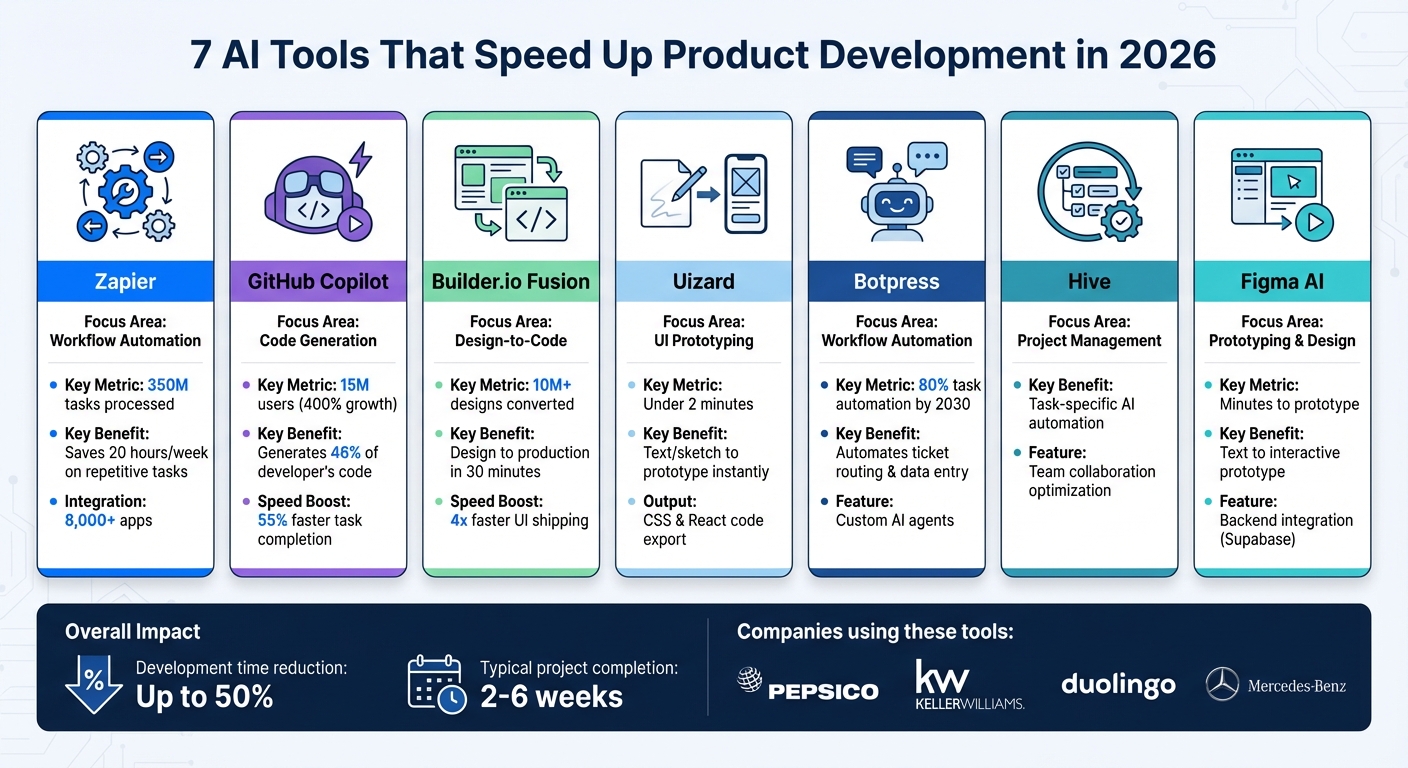
7 AI Tools for Product Development: Features and Benefits Comparison 2026
1. Zapier
Automation and Workflow Optimization
Zapier has become a powerhouse in automation, handling 350 million tasks for over 1 million companies. With integrations for nearly 8,000 applications, it’s a go-to platform for eliminating data silos and automating workflows across entire tech stacks.
One of its standout features is Zapier Copilot, an AI assistant that simplifies the creation of cross-product systems. With just natural language prompts, Copilot can generate workflows complete with canvases, tables, and interfaces. Another tool, Zapier Canvas, uses AI to create visual diagrams of workflows, helping teams spot and address bottlenecks before they cause delays.
Zapier is also pushing automation to the next level with its Autonomous AI Agents. These self-operating tools access live company data and complete complex, multi-step tasks across thousands of apps without human input. For example, Spencer Siviglia, Director of Operations at Toyota of Orlando, used these agents to manage over 30,000 lead records, saving 20 hours of work every week. He remarked:
"With Agents, I'm getting insights I didn't even know to look for."
Beyond automating workflows, Zapier is also a valuable tool for speeding up coding tasks and prototyping.
Code Generation and Prototyping Capabilities
Zapier’s Code by Zapier feature allows teams to write JavaScript or Python code through simple language descriptions. This makes it easier to prototype custom logic and test data transformations before committing to full development cycles.
The Model Context Protocol (MCP) bridges the gap between AI platforms like Claude or Cursor and Zapier’s 30,000+ actions. This means developers can connect external AI tools to thousands of apps without building individual API integrations, significantly cutting down the time needed for prototyping.
Integration with Other Tools and Platforms
Zapier’s strength lies in its ability to integrate seamlessly with essential tools. It offers nearly 500 AI integrations with leading models. Teams can connect knowledge sources like Google Drive, Notion, and Confluence directly to AI-driven workflows, ensuring automated responses are based on accurate company documentation.
For product teams, Zapier simplifies project management. For instance, when a new product variation is logged, Zapier can instantly create standardized projects in tools like Jira, Trello, and Asana, enabling teams to begin work immediately.
Impact on Time-to-Market
Zapier’s AI integrations have delivered measurable results. For example, Vendasta saved $1 million in manual administration time and cut 15 minutes off call handling time per call by leveraging Zapier. Jacob Sirrs, Marketing Operations Specialist at Vendasta, shared:
"Zapier is critical to Vendasta's operations - if we turned it off, we'd have to rebuild many workflows from the ground up."
Similarly, Contractor Appointments automated 80–90% of its lead handling, boosting annual revenue by $300,000. Marcus Saito, Head of IT and AI Automation, highlighted the efficiency gains:
"Zapier makes our team of three feel like a team of ten."
Zapier also tackles workflow failures with an AI troubleshooting feature that provides plain-language explanations, helping teams fix issues faster. By eliminating manual data entry and reducing configuration errors, Zapier removes common roadblocks that slow down development cycles. These features collectively streamline processes, helping teams move from ideas to product launches faster than ever.
We Ranked Every AI Tool for Product Managers - So You Don’t Have To
2. GitHub Copilot
GitHub Copilot has taken the concept of workflow automation pioneered by tools like Zapier and applied it to software development, reshaping how code is created, reviewed, and optimized.
Code Generation and Prototyping Capabilities
GitHub Copilot goes far beyond simple autocomplete features. By early 2025, its user base skyrocketed to 15 million - an impressive 400% growth in just a year. On average, it now generates 46% of a developer's code, with Java developers seeing even higher rates at 61%.
The tool’s capabilities have expanded significantly. For instance, GitHub Spark can turn natural language descriptions into fully deployed applications, complete with databases and authentication. Plan Mode in Visual Studio Code offers developers an AI-generated blueprint, ensuring their code aligns with the architecture they envision. The Copilot Edits feature allows for simultaneous updates across multiple files, simplifying tasks like refactoring. Agent Mode takes things a step further, autonomously analyzing codebases, suggesting edits, running tests, and validating results.
Beyond prototyping, Copilot now plays a role in streamlining code reviews and automating bug fixes, further reducing manual effort for developers.
Automation and Workflow Optimization
GitHub Copilot’s coding agent can be assigned to GitHub issues, where it explores repositories, identifies solutions, creates pull requests, and even provides automated suggestions to address security vulnerabilities - all before a human reviewer steps in.
This level of automation has delivered tangible results. In 2025, Duolingo reported that their engineers navigated unfamiliar codebases 25% faster, while Mercado Libre cut development iteration times in half using Copilot’s AI-driven features. Developers using Copilot complete tasks 55% faster compared to those working without it. Code reviews are 15% quicker, and an impressive 88% of the AI-generated code is retained in the final product.
Integration with Other Tools and Platforms
GitHub Copilot seamlessly integrates with popular IDEs, including Visual Studio Code, Visual Studio, JetBrains, and Xcode, as well as GitHub.com itself. It draws contextual insights from repositories, pull requests, issues, and discussions to provide relevant assistance.
The tool’s capabilities are further enhanced by MCP, which allows developers to incorporate custom AI tools and data sources, enriching project workflows. Developers can even choose from various language models like GPT-5, Claude 4.5, and Gemini 2.5 Pro to prioritize speed, accuracy, or cost.
For teams, Copilot Spaces offers a centralized hub to organize and share context from documentation and repositories, fostering better collaboration. On the command line, Copilot CLI enables developers to explain repository structures and execute complex workflows using natural language.
Impact on Time-to-Market
GitHub Copilot has made a measurable impact on development timelines. In enterprise environments, it has reduced the average time to open a pull request from 9.6 days to just 2.4 days - a fourfold improvement. Accenture reported that 67% of its developers used Copilot at least five days a week, leading to an 8.69% rise in pull requests, a 15% boost in merge rates, and an 84% increase in successful builds.
The productivity gains extend across industries. Grupo Boticário saw a 94% jump in developer productivity after adopting Copilot in 2025. Across the board, organizations report a 39% improvement in overall code quality with Copilot’s assistance.
Jasmine Ramos, IT Principal Product Manager at Mercedes-Benz, summed up the broader impact of Copilot:
"With the time savings Copilot unlocks, our developers are empowered to spend more time on the tasks they enjoy most - creative‐problem solving, innovative projects and experimentation."
3. Builder.io Fusion
Builder.io Fusion takes automation to the next level by seamlessly blending design and code for instant production deployment. Unlike tools that create disposable prototypes, Fusion integrates directly with your existing codebase and design system, transforming requirements into production-ready code.
Automation and Workflow Optimization
Fusion streamlines the entire development handoff process. Teams can simply tag @Builder.io in Slack or assign Jira tickets to the Fusion bot, which then takes over. It reads the requirements, creates a branch, and starts implementation. From there, the AI agent generates code, submits pull requests in platforms like GitHub, GitLab, Azure DevOps, or Bitbucket, and even resolves build failures and review comments independently.
For example, Black Rifle Coffee Company's engineering team saved more than 160 hours per sprint by adopting Builder's workflows. Similarly, Harry's growth engineering team cut their design-to-production timeline to just one day. Sharon Hau, Senior Manager of Growth Engineering at Harry's, shared how this changed their approach:
"With our old tool, if growth marketers asked me for something, I'd probably say it wasn't possible... Now, everything they ask, I say 'yeah, it's doable.'"
This level of automation lays the foundation for Fusion's advanced code generation capabilities.
Code Generation and Prototyping Capabilities
Fusion doesn't just generate code - it uses your team's actual production components, such as Button and Card, ensuring everything aligns with your standards. By mapping your design system, it creates deployable features that are ready for production.
Incredibly, Fusion can convert designs and PRDs into working features in just 30 minutes, significantly reducing the time needed for traditional sprints. To date, over 10 million designs and PRDs have been turned into production features through Fusion. A Principal Product Manager at a Fortune 500 fintech company highlighted the shift:
"You're no longer handing off specs…You're handing off a functional piece of software to an engineer for review and discussion."
Integration with Other Tools and Platforms
Fusion integrates effortlessly with the tools teams already rely on. It syncs with Figma, allowing designs to be imported and mapped to existing code components. Developers can even export UI changes back to Figma. Through Model Context Protocol (MCP) servers, Fusion connects to databases like Supabase and Neon, deployment platforms such as Netlify, and automation tools like Zapier.
The VSCode extension further enhances collaboration by synchronizing native coding with Fusion's visual preview. Designers and product managers can propose code changes directly through pull requests, removing traditional bottlenecks in the development cycle.
Impact on Time-to-Market
Fusion's automation and integration features dramatically accelerate development timelines. Teams using Builder.io report shipping UI components four times faster. For instance, J.Crew doubled their speed-to-market after implementing Builder. Sam Feldman, Manager of Creative Technology at J.Crew, noted how this improved their go-to-market efficiency.
TechStyle Fashion Group saw a 20% boost in development capacity, enabling them to reallocate budgets from maintenance tasks to strategic growth projects like conversion optimization. Meanwhile, Zapier used Builder to launch over 250 new pages while enhancing homepage conversion rates through rapid experimentation.
4. Uizard

Uizard is an AI-powered tool designed to transform text prompts into fully functional UI prototypes. This feature simplifies the creative and prototyping process, making it faster and more accessible. With Autodesigner 2.0, teams can generate multi-screen, editable mockups in under two minutes, enabling them to visualize product ideas almost instantly. Christopher Nguyen, Founder of UX Playbook, highlighted its impact, stating, "AI means Product Managers can now do 80% of a UX Designer's job." By quickly converting ideas into tangible prototypes, Uizard speeds up the early stages of product development.
Automation and Workflow Optimization
Uizard eliminates tedious design tasks by turning screenshots and hand-drawn sketches into editable mockups. Teams can explore up to 10 different design iterations in about 20 minutes, significantly cutting down the time spent on initial brainstorming.
The platform’s Focus Predictor uses AI to create attention heatmaps, predicting where users are likely to focus before formal testing even begins. Additionally, its Text Assistant and Theme Generator automatically craft contextual copy, page titles, CTAs, and even full brand kits based on keywords or images. These features streamline workflows, allowing teams to focus on refining ideas rather than starting from scratch.
Code Generation and Prototyping Capabilities
Uizard goes beyond visual design by offering code export options, including CSS and React code. This capability bridges the gap between design and development, allowing teams to toggle between low- and high-fidelity designs to address functionality before perfecting aesthetics. David Pereira, a Product Manager, summed up the speed advantage: "From zero to a clickable prototype in 30 seconds, that's unbelievable."
The platform also enables the creation of interactive prototypes with functional user flows and dynamic links between screens. These prototypes can be shared via smart links for quick stakeholder feedback and approval. Elizabeth from DesignerUp expressed her amazement, saying, "I can't believe I just watched AI turn a boring text prompt into a complete UI design and flow right before my eyes in seconds."
Integration with Other Tools and Platforms
Uizard integrates seamlessly with other tools like Figma and offers real-time collaboration features, connecting AI-driven ideation with professional design refinement. This setup allows product managers, designers, and developers to work together in a shared environment. Nolan Perkins, a designer, emphasized the benefits: "Uizard I think is going to help bridge the gap from idea to visualization which will help designers move faster, and product managers communicate better." Its ability to incorporate both physical sketches and digital screenshots ensures that ideas from any source can be easily integrated into the workflow.
Impact on Time-to-Market
The time savings provided by Uizard directly contribute to faster product launches. One customer shared their experience: "The fact that you can have something visual with Uizard in less than one minute has massively improved our workflow."
To support various needs, Uizard offers flexible pricing plans: a free plan at $0/month (2 projects, 3 AI generations), Pro at $12/month (100 projects, 500 AI generations with React/CSS handoff), Business at $39/month (unlimited projects, 5,000 AI generations), and custom Enterprise plans for unlimited AI generations and design system setup. These options make Uizard accessible to teams of all sizes, from startups to large enterprises.
sbb-itb-765bc22
5. Botpress

Botpress is an AI agent platform designed to help teams streamline and automate complex product development workflows. Backed by a $25M Series B funding round, it employs a custom inference engine called LLMz. This engine manages agent behavior, handles memory, and executes JavaScript in a secure sandbox environment, making it a powerful tool for development teams.
Automation and Workflow Optimization
Botpress is particularly effective at automating repetitive tasks like ticket categorization, routing, and data entry. By handling these time-consuming activities, it allows developers and product managers to concentrate on higher-level strategic work. Bogdan Alexandru, Head of Support at Ruby Labs, highlighted this benefit:
"We have found Botpress's pre-built workflows that execute AI tasks particularly valuable. Instead of spending time training a model from scratch, we can quickly deploy AI capabilities."
The platform's AI agents are designed to maintain context in stateful and persistent conversations, even during complex, multi-step processes. Developers can also add custom code to an agent’s lifecycle events, ensuring full visibility and control over its actions. According to projections, AI could automate up to 80% of project management tasks by 2030, making tools like Botpress essential for modern workflows.
Code Generation and Prototyping Capabilities
Botpress offers robust tools for rapid prototyping and development. Its Studio visual conversation builder, Agent Development Kit, and integrated JavaScript editor enable teams to quickly create custom actions, debug in real time, and catch logic errors before deployment using the built-in emulator. Studies show that AI-driven tools like Botpress can cut product development timelines in half and increase throughput for planning and scheduling tasks by 30%.
Integration with Other Tools and Platforms
Botpress seamlessly integrates with popular product management and engineering tools like Linear, Jira, Notion, and Mixpanel, consolidating project updates in one place. Through its Integrations Hub, the platform connects agents to communication channels such as WhatsApp, Telegram, and Zendesk, as well as automation platforms like Zapier.
JoeK, a member of the Botpress community, shared his experience:
"Botpress makes it very easy to host bots on their cloud servers and they have a lot of integrations with platforms such as WhatsApp, Telegram, Zapier, Zendesk."
Each AI agent operates within its own isolated, version-controlled environment, ensuring compatibility over time. The platform’s Knowledge Bases feature allows agents to reference existing documentation and business data, providing instant support when needed. For enterprise users, Botpress meets high security standards, being SOC 2 Certified and GDPR Compliant.
Impact on Time-to-Market
By automating routine tasks and enabling Human Handoff workflows, Botpress helps teams accelerate product launches. These automations reduce response times and ensure that the right tasks are assigned to the right team members. The result? Teams can stay agile and focus on driving innovation. Botpress offers a free tier for initial testing and building, alongside pay-as-you-go and enterprise plans for larger organizations.
Carolyn M, a Bot Builder, praised the platform's community and resources:
"Botpress is a great platform with a strong community of developers around the world that are welcoming and open to sharing their time, resources, and elevating best practices among bot builders."
6. Hive

Hive simplifies product development by automating project management and team collaboration. Its use of focused AI tools helps streamline operations, allowing teams to work more efficiently. By automating repetitive tasks, Hive enables deeper integration into workflows, making it easier for teams to concentrate on strategic priorities.
Automation and Workflow Optimization
Hive employs AI agents designed for specific tasks, automating routine work and reducing manual effort. This approach reflects a growing preference for specialized AI tools over broad, one-size-fits-all solutions.
Impact on Time-to-Market
With these efficiencies, AI tools are evolving from being assistants to functioning as autonomous contributors, speeding up product development. Hive's advanced features enable teams to work more flexibly and bring their projects to market faster, supporting a more dynamic and responsive development process.
7. Figma AI
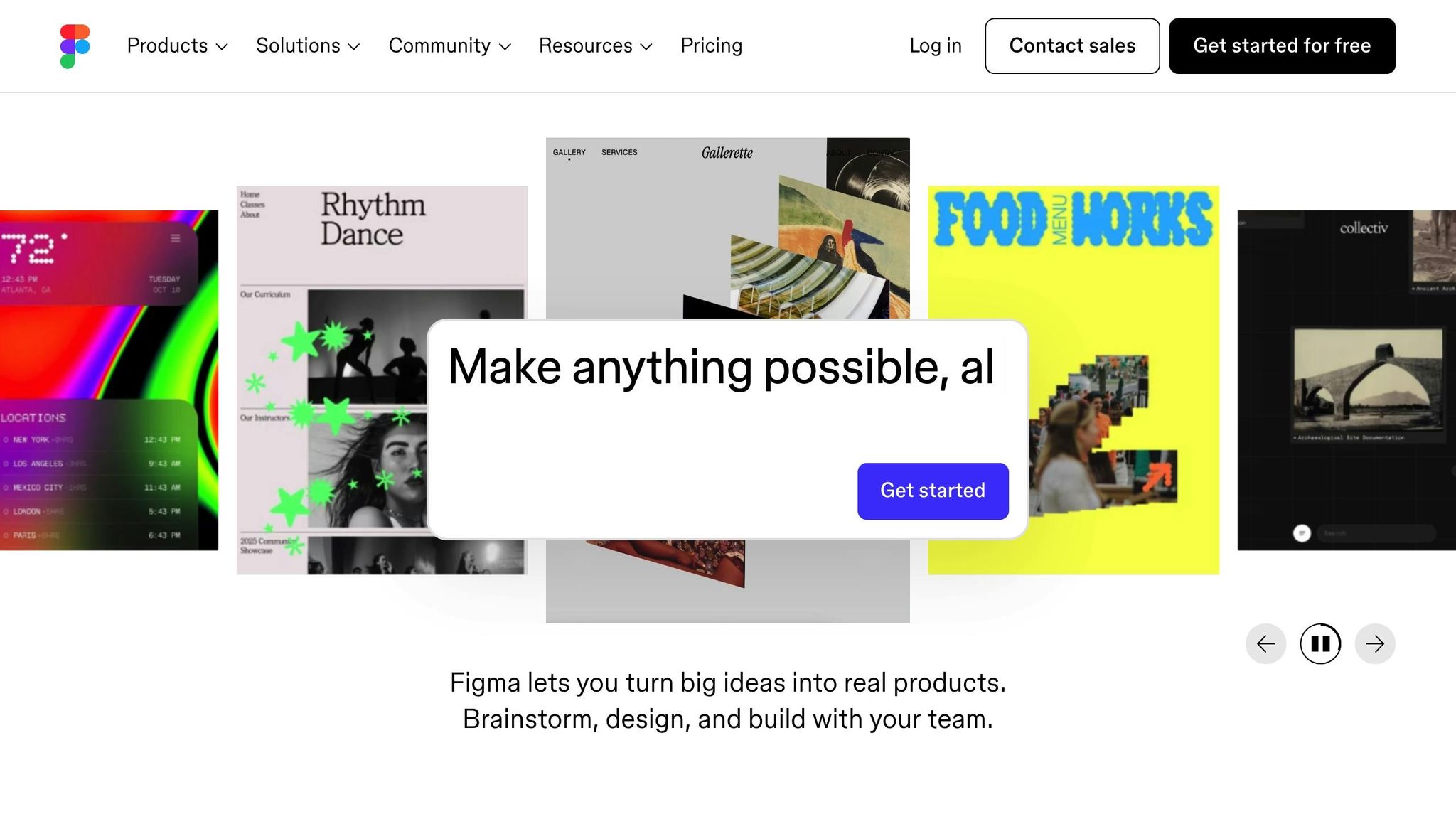
Figma AI transforms plain text into fully interactive, high-fidelity prototypes in just minutes. The platform's standout feature, Figma Make, removes the need for traditional wireframing steps, allowing teams to jump straight into testing and refining prototypes without delay. Instead of drafting long product requirement documents, product managers can now create tangible prototypes almost instantly. This approach simplifies both design and development, paving the way for seamless, code-ready workflows.
Prototyping and Code Generation Capabilities
Figma AI leverages its Model Context Protocol (MCP) to connect design work with popular coding tools like VS Code, Cursor, Windsurf, and Claude. Additionally, Figma Sites enables teams to launch fully responsive websites - complete with animations and interactive elements - using nothing more than text prompts. This tight integration eliminates the need to switch between applications, giving developers access to complete design specs directly within their tools and reducing the typical friction in the design-to-code process.
A notable example of Figma AI’s potential came in November 2025, when entrepreneur Aaron Veale used Figma Make to create a marketplace app for small farmers in British Columbia. The app, designed to help local growers sell directly to consumers and avoid factory farm costs, was built in just a few weeks.
Integration with Development Workflows
Figma AI doesn’t stop at prototyping - it also enhances development workflows by directly linking to backend systems like Supabase. This allows teams to integrate features like user authentication and private APIs into their prototypes without writing a single line of code. The platform also employs advanced AI models, including Gemini 3.0 Pro and OpenAI’s GPT Image 1, for tasks like image generation and refinement. Developers can even embed React components and production logic directly into Figma Make, ensuring prototypes function like real-world applications and generate code that fits seamlessly into existing tech stacks.
Accelerating Time-to-Market
Figma AI continues the trend of speeding up deployment timelines by automating tedious design tasks like contextual layer renaming, background removal, and generating realistic content. With instant prototyping, real data integration, and smooth handoffs to developers, teams can validate ideas and roll out features much faster. This aligns with the broader 2026 trend where most AI-accelerated projects are completed and launched in just 2 to 6 weeks, depending on their complexity.
Conclusion
The AI tools highlighted here are reshaping how product development works in 2026. What once took months of documentation and planning can now be done in minutes or days, drastically cutting down time-to-market. These tools not only speed up processes but also lower costs by automating repetitive tasks. They help align product managers' visions with developers' execution, reducing miscommunication and the need for rework.
The secret to making the most of these tools is choosing the right one for your needs. For instance, product managers aiming to validate ideas quickly might find Figma Make invaluable for turning concepts into interactive prototypes without any coding. On the other hand, developers working on complex applications can rely on GitHub Copilot to handle tasks like debugging and multi-file edits. For teams juggling workflows across departments, platforms like Zapier can eliminate tedious manual processes.
A great starting point is to focus on one or two tools that address your biggest challenges - whether that's slow prototyping, inefficient workflows, or misaligned design-to-development processes. The time spent learning these platforms can quickly pay off when you're able to release features in weeks instead of months. As Kevin Green, Co-founder and CMO of Hapax, aptly puts it:
"Some people will stay on the stairs, which is slower, harder and less efficient. Others will step into the elevator and trust that it's going to take them to the top floor".
The companies thriving in 2026 aren't just using AI - they're leveraging targeted tools that streamline specific parts of their development process. From automation to rapid prototyping, each tool plays a critical role in reshaping how teams work. Try out these seven tools on your projects, track the time saved, and build systems that address your team's unique needs.
FAQs
How can AI tools like GitHub Copilot and Builder.io Fusion help speed up product development timelines?
AI tools such as GitHub Copilot and Builder.io Fusion are making waves in development by cutting down the time it takes to complete essential tasks. GitHub Copilot helps developers by turning natural language prompts into functional code, taking care of repetitive coding tasks so they can concentrate on solving more intricate problems.
On the other hand, Builder.io Fusion speeds up workflows by transforming design specs or product ideas into ready-to-use prototypes and code almost instantly. It integrates smoothly with existing repositories and design systems, enabling teams to transition from ideas to execution with impressive efficiency.
What are the main advantages of using Zapier to automate workflows in product development?
Zapier takes the hassle out of product development by automating repetitive tasks and organizing workflows. Imagine this: when your team creates a new product version, Zapier can instantly set up a project and generate a task list in tools like Asana, Trello, or Jira. This means your team starts with a clear roadmap, avoids time-consuming manual setup, and reduces the chances of overlooking important steps.
The platform's AI-powered Copilot takes things a step further. It helps you design and fine-tune workflows without needing to write a single line of code. Copilot can recommend app integrations, auto-fill details, and even troubleshoot issues, making it easier to connect tools like Google Workspace, Slack, and Salesforce. By cutting down on manual work and boosting efficiency, Zapier lets your team focus on what truly matters: building exceptional products and getting them to market without unnecessary delays.
How does Uizard quickly turn text prompts into interactive UI prototypes?
Uizard’s Autodesigner 2.0 takes advantage of cutting-edge AI to transform natural language prompts into polished UI mockups and interactive prototypes. With the help of a sophisticated generative model, it seamlessly converts text into design elements, including layouts, themes, and functional components, all in a matter of moments.
This efficient approach removes the hassle of manual design, allowing you to quickly bring your concepts to life and refine them throughout the product development journey.